

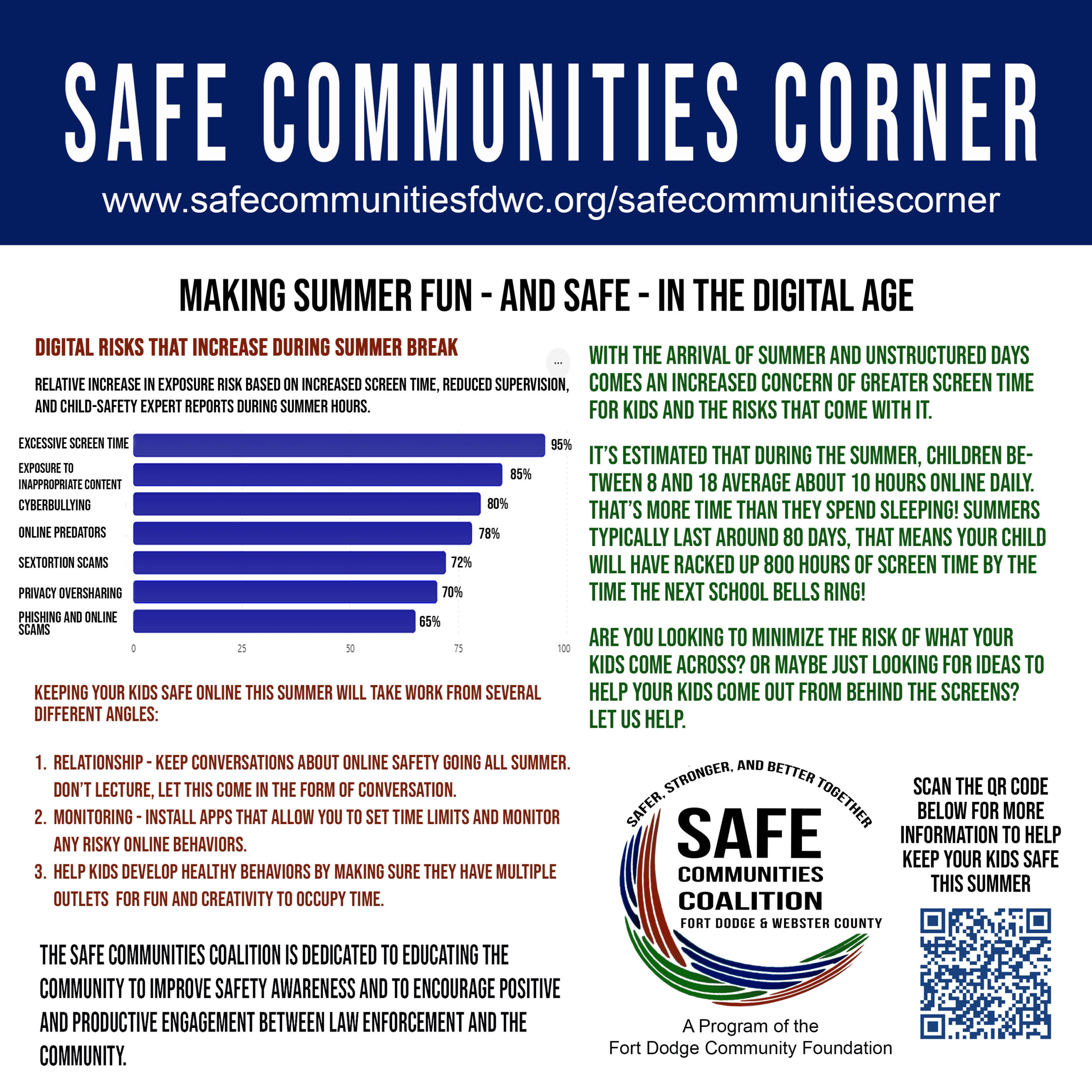
Making Summer Fun—and Safe—in the Digital Age
Summer is a season kids look forward to all year. School is out, schedules are lighter, and long days create opportunities for fun, exploration, and independence. But for many parents, summer also brings a new challenge: managing increased screen time and the digital risks that come with it.
With fewer structured activities and more unsupervised hours, children and teens often spend significantly more time online during the summer months. Whether they’re gaming, scrolling social media, watching videos, or chatting with friends, that increased online activity can expose them to cyberbullying, inappropriate content, scams, privacy risks, and even online predators.
The good news is that families can take practical steps to reduce these risks while helping kids enjoy a safe, engaging, and memorable summer.
Why Summer Increases Digital Risks
When school is in session, much of a child’s day is structured and supervised. During summer break, many kids gain extra freedom online. More time connected means more opportunities to encounter:
- Inappropriate or explicit content
- Cyberbullying and online harassment
- Phishing scams and fraudulent messages
- Privacy and oversharing concerns
- Sextortion and exploitation schemes
- Online predators posing as peers
Predators often seek out young people on social media platforms, gaming communities, messaging apps, and other online spaces where kids gather. They may build trust over time before attempting to manipulate or exploit a child.
Protecting Devices from Predators and Inappropriate Content
Technology can be a valuable tool when used safely. Consider these strategies to help protect your children online:
1. Enable Parental Controls
Most devices, gaming systems, streaming services, and internet providers offer parental control settings that can:
- Block inappropriate websites
- Restrict app downloads
- Limit purchases
- Filter search results
- Set screen-time limits
Review these settings regularly as your child grows and their online habits change.
2. Use Content Filtering Software
Install trusted filtering and monitoring tools that help block explicit content and alert parents to potentially dangerous online activity. While no filter is perfect, they provide an important layer of protection.
3. Keep Devices in Shared Spaces
Whenever possible, encourage younger children to use computers, tablets, and gaming systems in common areas of the home rather than behind closed doors.
4. Monitor Privacy Settings
Help your children:
- Set social media accounts to private
- Limit who can contact them
- Disable location sharing when unnecessary
- Avoid posting personal information such as addresses, phone numbers, or vacation plans
5. Teach the “Never Share” Rule
Kids should never share:
- Home addresses
- School information
- Phone numbers
- Passwords
- Financial information
- Personal photos with strangers
Remind them that people online are not always who they claim to be.
6. Know the Apps They Use
Take time to familiarize yourself with the apps, games, and platforms your children use. Understand how messaging works, what privacy settings are available, and whether strangers can contact them.
7. Have Ongoing Conversations
The most effective safety tool isn’t an app—it’s communication. Make online safety a regular conversation rather than a one-time lecture. Encourage your child to tell you if something online makes them uncomfortable, confused, or scared.
Helping Teens Stay Busy Without Screens
One of the best ways to reduce digital risks is to give teens meaningful alternatives. While screens are a part of modern life, summer can also be an opportunity to explore interests, build skills, and create real-world connections.
Volunteer in the Community
Teens can:
- Help at food pantries
- Assist with community events
- Support local nonprofit organizations
- Participate in neighborhood cleanups
Volunteering builds confidence, responsibility, and leadership skills while strengthening community connections.
Find a Summer Job
Part-time employment provides:
- Work experience
- Financial responsibility
- Time management skills
- Opportunities to meet new people
Even a few hours each week can significantly reduce idle screen time.
Explore the Outdoors
Encourage activities such as:
- Hiking
- Fishing
- Biking
- Camping
- Geocaching
- Gardening
Outdoor activities promote physical and mental well-being while providing a healthy break from technology.
Learn a New Skill
Summer is a great time for teens to:
- Learn photography
- Cook new recipes
- Play an instrument
- Build model projects
- Practice woodworking
- Learn basic car maintenance
- Take an art class
Join Community Programs
Look for:
- Library programs
- Sports leagues
- Recreation department activities
- Youth groups
- Faith-based programs
- Community theater productions
Structured activities provide supervision, social interaction, and opportunities for growth.
Create a Summer Challenge
Families can create goals such as:
- Reading 10 books
- Visiting local parks
- Learning a new hobby
- Completing a service project
- Trying a new activity each week
Encourage Face-to-Face Friendships
Help teens organize:
- Pick-up sports
- Board game nights
- Bonfires
- Group hikes
- Community events
Strong in-person relationships can reduce reliance on social media for connection.
A Balanced Approach
Technology isn’t the enemy. It helps us learn, connect, and entertain ourselves. The goal isn’t to eliminate screens entirely but to create a healthy balance between online and offline activities.
By combining open communication, smart device safeguards, and engaging real-world opportunities, parents can help children enjoy the freedom of summer while staying safe from digital risks.
This summer, let’s make screen time safer, conversations stronger, and memories bigger than what can fit on a phone screen.
Quick Summer Safety Checklist
☐ Enable parental controls on devices
☐ Review privacy settings on social media
☐ Talk regularly about online safety
☐ Keep younger children’s devices in common areas
☐ Establish screen-time expectations
☐ Plan screen-free activities each week
☐ Encourage volunteering, work, or community involvement
☐ Create opportunities for face-to-face social interaction
☐ Teach kids how to recognize scams and suspicious behavior
☐ Remind children that they can always come to a trusted adult for help
Below I’ve linked another website that contains valuable information on this particular topic.
https://www.protectyoungeyes.com/
A safe summer starts with awareness, communication, and balance.