













Safe Communities Coalition of Fort Dodge and Webster County
Safe communities of Webster County is a network of agencies and individuals working to keep our community safe and informed.

Recognizing the Invisible: Understanding Domestic Abuse Beyond the Bruises
October is Domestic Abuse Awareness Month, a time to recognize the realities of domestic violence, support survivors, and remind our community that abuse is not always easy to see. While physical violence may leave visible injuries, many forms of abuse leave no outward marks at all. Emotional manipulation, intimidation, isolation, and financial control can quietly take hold behind closed doors, often without friends, family members, or neighbors realizing what is happening.
Here in Fort Dodge and throughout Webster County, we take pride in being a community that looks out for one another. But looking out for our neighbors also means understanding that someone experiencing abuse may not feel safe enough to ask for help or share what is happening in their home.
Abuse Isn't Always What We Think It Is
When we hear the words domestic abuse, many of us picture physical violence. While physical harm is a serious form of abuse, domestic violence can take many forms, and some of the most damaging behaviors may be difficult to recognize from the outside.
Abuse can include:
Emotional abuse: Constant criticism, humiliation, threats, intimidation, or making someone feel worthless.
Financial abuse: Controlling access to money, preventing a partner from working, taking their earnings, or restricting their ability to make financial decisions.
Isolation: Limiting contact with friends and family, monitoring relationships, or making someone feel guilty for spending time with others.
Coercive control: Using fear, manipulation, threats, or constant monitoring to control another person's choices, movements, and daily life.
Digital abuse: Monitoring phones or social media, demanding passwords, tracking someone's location, or using technology to threaten or harass a partner.
These behaviors may develop gradually. What begins as jealousy or a desire to know where someone is can become a pattern of control that leaves a person feeling trapped, anxious, and unsure of themselves.
A person experiencing abuse may become withdrawn, seem unusually anxious around their partner, frequently make excuses for someone else's behavior, or appear to have little control over their own decisions. However, there is no single way a survivor looks or acts. Some people may hide what is happening for years, while others may not immediately recognize their experience as abuse.
The absence of visible injuries does not mean the absence of harm.
Why Leaving Isn't Always Simple
It can be tempting to ask why someone experiencing abuse doesn't simply leave. But leaving an abusive relationship is often far more complicated than it appears from the outside.
A survivor may fear that leaving will escalate the violence. They may worry about their children's safety, lack access to money or transportation, or have nowhere safe to go. Some may face threats involving custody, housing, pets, or their immigration status. Others may still love their partner and hope the situation will improve.
Abuse can also gradually erode a person's confidence and sense of independence. When someone has been repeatedly told they are incapable, unworthy, or responsible for the abuse, reaching out for help can feel overwhelming.
There is no single timeline for leaving, and every situation is different. Survivors deserve patience, compassion, and the freedom to make decisions based on their own safety and circumstances.
If someone you care about is experiencing abuse, you do not need to have all the answers. Listening without judgment, expressing concern, and helping them connect with trained professionals can make a meaningful difference.
The Need for Local Support Is Real
Domestic violence is not just an issue affecting other communities or people we see in the news. It affects individuals and families right here in our own neighborhoods.
In a single year, the Domestic/Sexual Assault Outreach Center (D/SAOC) in Fort Dodge provided 6,094 bed nights of emergency shelter to local adults and children fleeing violence. Each bed night represents a night of safety and shelter for someone who needed a place to turn.
Behind that number are people making difficult decisions, parents working to protect their children, and individuals taking steps toward a safer future. Emergency shelter provides more than a roof. It can offer a critical opportunity to connect with advocates, explore options, and begin planning for what comes next.
This is why local services matter. Survivors need more than encouragement to leave an unsafe situation. They need access to confidential support, safety planning, shelter, and resources that can help them navigate the challenges ahead.
How Can We Help Someone Experiencing Abuse?
You do not have to be an expert to support a survivor. Small, thoughtful actions can help someone feel less alone.
Listen without judgment. If someone confides in you, believe them and allow them to share at their own pace. Avoid questioning why they stayed or suggesting that they should have handled things differently.
Express concern with compassion. You might say, “I'm concerned about you, and I want you to know I'm here if you need help.” Let them know they deserve to feel safe and respected.
Respect their choices. Pressuring someone to leave before they are ready can increase feelings of isolation and may create additional risks. Encourage them to speak with a trained advocate who can help them consider their options safely.
Offer practical help when appropriate. Depending on the person's circumstances, help might mean providing a ride, watching children, sharing information about local resources, or simply being available for a conversation. Always consider whether your offer could be discovered by the abusive person.
Protect their privacy. Do not share their story with others without permission. If their phone or online activity may be monitored, ask what method of communication is safest before sending messages or sharing resources.
Most importantly, remember that supporting someone does not mean taking control of their situation. It means helping them regain a sense of safety, dignity, and choice.
Local Help Is Available
If you or someone you care about is experiencing domestic abuse, confidential local support is available through the Domestic/Sexual Assault Outreach Center (D/SAOC) in Fort Dodge.
Local crisis line: 515-955-2273
Toll-free crisis line: 1-888-356-2006
Availability: 24 hours a day, seven days a week.
You do not need to wait until abuse becomes physical or until a situation reaches a crisis point to ask for help. Advocates can help individuals understand their options and explore safety planning based on their unique circumstances.
If you believe someone is in immediate danger, contact 911 when it is safe to do so. If you suspect a device or online account is being monitored, consider reaching out from a safer phone or device.
Building a Safer Community Together
The Safe Communities Coalition of Fort Dodge and Webster County is dedicated to educating our community, increasing safety awareness, and encouraging positive, productive engagement between law enforcement and the community.
Recognizing domestic abuse is part of that work. When we understand that abuse can exist without visible injuries, we become better equipped to recognize concerns, respond with compassion, and connect people with appropriate support.
Domestic abuse thrives in silence and isolation. Awareness helps break that silence. Compassion helps survivors feel seen. And access to local resources can help people take steps toward safety.
This October, let's look beyond what we can see. Let's remember that the person who seems withdrawn, the neighbor who rarely has visitors, or the friend who always seems worried may be carrying something we cannot begin to imagine.
Abuse is closer than you think. Help is closer than you think, too.
Together, we can help make Fort Dodge and Webster County safer places for everyone.
0 CommentsComment on Facebook
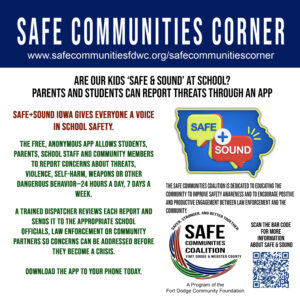
When Something Doesn’t Feel Right: How Safe+Sound Iowa Gives Students and Families a Voice
What if a student sees something concerning, but doesn’t know who to tell?
Maybe a student hears a classmate talking about hurting themselves. Maybe someone sees a concerning message or post on social media. Maybe a student knows about a weapon at school, hears about a planned act of violence, or notices behavior that makes them genuinely worried about someone’s safety.
Sometimes the hardest part isn’t recognizing that something is wrong. It’s knowing what to do next.
That’s where Safe+Sound Iowa comes in.
Safe+Sound Iowa is a free, anonymous school-safety reporting system developed by Iowa’s Governor’s School Safety Bureau. It gives students, parents, school staff and community members a way to report safety concerns so they can be reviewed and routed to the people who can help.
You Don’t Have to Know Exactly What to Do
One of the most important things to understand about Safe+Sound Iowa is that you don’t have to be a school administrator, law enforcement officer or mental-health professional to use it.
If something concerns you, you can report it.
Reports can involve concerns such as:
Threats of violence
Weapons at or related to school
Planned attacks
Self-harm or suicide threats
Assault or threats to harm others
Drug-related concerns
Bullying, victimization or other threatening behavior
A student who may be in crisis
Other school-safety concerns
The system is designed to help identify concerns before they become a crisis.
And that includes concerns that may originate online. If a student sees a troubling social-media post, message or other information that raises a legitimate safety concern, the reporting system can provide a way to pass that information along.
What Happens When You Make a Report?
Safe+Sound Iowa isn’t simply a form that disappears into a database.
Reports are monitored by trained Safe+Sound Iowa personnel. After a report is submitted, a dispatcher may communicate with the person making the report to ask follow-up questions or gather additional information. The information is then evaluated and shared with appropriate school officials, law enforcement or other community partners, depending on the nature of the concern.
That process is important because details matter.
For example, a report might include information about what was said, when and where something happened, who may be involved, or screenshots, photos or other information that could help officials understand the situation.
The more useful information a person can provide, the better equipped those responding to the report are to determine the appropriate next steps.
Anonymous Doesn’t Mean You’re Left in the Dark
A common concern about reporting is, “What if they need more information from me?”
Safe+Sound Iowa allows people to make reports anonymously while still providing a way for dispatchers to communicate with the person making the report.
After submitting a report, users can receive follow-up questions and can return to their report to provide additional information or see responses.
That means someone who is hesitant to come forward because they are afraid of retaliation or simply don’t know whom to contact has another option.
It Isn’t Just for Students
Safe+Sound Iowa isn’t limited to the person experiencing the problem.
Parents can use it. Teachers and school employees can use it. Community members can use it.
Sometimes a parent notices something at home. A teacher may notice a significant change in a student’s behavior. A friend may hear something that doesn’t feel right. A community member may come across information involving a local school.
You don’t have to be directly involved in a situation to recognize that it deserves attention.
Safe+Sound Iowa was created specifically to give those people a way to communicate a concern.
Three Ways to Report
Safe+Sound Iowa provides three ways to submit a concern:
📱 Through the free Safe+Sound Iowa mobile app
💻 Online at SafeandSoundIowa.gov
📞 By calling 800-224-6018
The reporting system is designed to be available 24 hours a day, seven days a week, with trained personnel monitoring reports.
As of June 2026, the Governor’s School Safety Bureau reports that 52% of Iowa schools utilize Safe+Sound Iowa.
What If It’s an Emergency?
Safe+Sound Iowa is a tool for reporting and addressing safety concerns: but it should not replace 911 when an emergency is happening right now.
If someone is in immediate danger, a crime is in progress, or emergency assistance is needed, call 911.
For concerns that may not require an immediate emergency response but still need to be brought to the attention of the appropriate people, Safe+Sound Iowa provides another avenue for getting that information where it needs to go.
Speaking Up Can Be the First Step
School safety isn’t only about what happens after something goes wrong.
It’s also about recognizing warning signs, taking concerns seriously and creating ways for people to speak up before a situation reaches that point.
A student shouldn’t have to wonder, “Who am I supposed to tell?”
A parent shouldn’t have to wonder, “Is this serious enough to report?”
And a person who is afraid of being identified shouldn’t have to choose between staying silent and putting themselves at risk.
Safe+Sound Iowa gives students, families, school staff and community members another option: Speak up. Share the concern. Let the people trained to respond take it from there.
Because sometimes, the information someone is hesitant to share is the information that needs to be heard.
Learn More
To learn more about Safe+Sound Iowa or submit a report, visit SafeandSoundIowa.gov, download the Safe+Sound Iowa app, or call 800-224-6018.
Safe+Sound Iowa is a statewide school-safety reporting program administered by Iowa’s Governor’s School Safety Bureau.
0 CommentsComment on Facebook
AI: A Deeper Dive Into the Consequences
What Parents Need to Know About How AI Can Affect the Way Children See, Think, and Understand the World
Artificial intelligence is changing the world around us. It can help us learn, create, solve problems, and connect—but it also creates new challenges, especially for children who are still developing the skills needed to evaluate information and understand what they see online.
Our graphic looks at eight ways AI can influence us and the potential consequences.
1. AI Blurs the Line Between Reality and Fiction
We can lose confidence in our ability to tell what is real.
AI can create or alter photographs, videos, voices, and conversations so convincingly that it can be difficult to tell what actually happened.
For children, this makes media literacy more important than ever. Teach them to ask:
Who created this?
Where did it come from?
Can I verify it somewhere else?
What evidence supports it?
Seeing something online is no longer proof that it is real.
2. AI Can Create a False Sense of Consensus
We can mistake repetition for truth.
When children see the same claim repeatedly online, they may assume it must be true—or that "everyone" believes it.
But repetition isn't evidence.
Help children understand the difference between:
"I've seen this many times."
and
"I've verified that this is true."
Popularity does not make information accurate.
3. AI Can Reinforce Our Existing Beliefs
Echo chambers can become even stronger.
Technology can personalize what we see based on our interests and previous interactions. Over time, children may find themselves surrounded by information that confirms what they already believe.
Encourage them to ask:
"What would someone who disagrees with me say?"
"What evidence supports this?"
"Have I looked at another reliable source?"
The goal isn't to tell children what to believe. It's to teach them how to think.
4. AI Can Influence and Manipulate Our Emotions
We may make decisions based on emotion instead of evidence.
AI can help create content designed to capture attention and provoke strong emotional reactions—fear, anger, excitement, or outrage.
For children and teenagers, this can be particularly powerful.
Teach them to pause when something makes them feel extremely emotional and ask:
"Why is this making me feel this way?"
"Is someone trying to get a reaction from me?"
Strong emotions can make critical thinking harder.
5. AI Can Replace Authentic Human Experiences
Authenticity can become harder to recognize.
AI can now generate writing, artwork, music, photographs, voices, and conversations.
Technology can be useful, but children also need to understand the value of experiences that are genuinely human—a handwritten note, a conversation with a grandparent, creating something imperfectly, or simply spending time with another person.
Technology should enhance human connection, not replace it.
6. AI Can Change Our Expectations of Reality
Real life can begin to feel inadequate by comparison.
AI can create images of seemingly perfect people, homes, vacations, bodies, and lifestyles.
Children may compare their real lives with something that was digitally created and never existed in reality.
That can affect how they see themselves and their own lives.
Help children understand the difference between what is real and what is digitally created or enhanced.
7. AI Can Rewrite History
Our understanding of the past can become vulnerable to manipulation.
AI makes it easier to alter photographs, generate audio, create videos, and produce convincing written material.
For children learning about history and current events, this makes understanding sources especially important.
Teach them to ask:
Who created this?
When was it created?
What evidence supports it?
Can the information be independently verified?
The more convincing technology becomes, the more important verification becomes.
8. AI Can Overwhelm Us With Information
Too much information can make critical thinking difficult.
AI can produce enormous amounts of information almost instantly. For children, it can become difficult to determine what's accurate, relevant, biased, or trustworthy.
There's also a risk that children will use AI to provide answers without actually learning how to reach those answers themselves.
Encourage children to use AI as a learning tool—not a replacement for thinking.
Instead of:
"Give me the answer."
Try:
"Help me understand how to solve this."
What Can Parents Do?
Parents don't need to keep children away from AI. They need to help them learn how to navigate it.
Teach children to:
Pause before believing or sharing something.
Verify information instead of accepting the first answer.
Question images, videos, and online claims.
Recognize emotional manipulation.
Consider different perspectives.
Value real-world relationships and experiences.
Think critically—even when technology provides an easy answer.
The Conversation We Need to Have
Our children don't need to be afraid of artificial intelligence. They need to be curious, skeptical, thoughtful, and equipped to question what they're seeing.
Because in a world where technology can increasingly create something that looks real, sounds real, and feels real—
critical thinking may be one of the most important forms of protection we can give our children.
Safe Communities Corner
The Safe Communities Coalition is dedicated to educating the community, improving safety awareness, and encouraging positive and productive engagement between law enforcement and the community.
Safer. Stronger. Better Together.
0 CommentsComment on Facebook
The Life of Artificial Intelligence: From Science Fiction to Everyday Life
Artificial intelligence is no longer just a futuristic concept, it’s quietly reshaping the world around us every day. From unlocking your phone with your face to the recommendations on your favorite streaming service, AI has become part of everyday life. What began as a bold scientific dream has grown into one of the most influential technologies of our time, changing how we work, learn, create, and communicate. Understanding where AI came from, and where it’s taking us next, has never been more important.
The Birth of an Idea
The idea of creating machines that could “think” has fascinated scientists for generations. While the concept dates back centuries in literature and philosophy, the modern field of artificial intelligence officially began in 1956 when computer scientist John McCarthy coined the term Artificial Intelligence at the Dartmouth Conference.
Researchers believed that computers could eventually perform tasks requiring human intelligence, such as reasoning, problem-solving, and learning. Although early computers had limited processing power, the vision for AI had been established.
Early Successes and Early Setbacks
The 1960s brought optimism. Computers learned to solve mathematical problems, understand simple language, and even navigate basic environments. Researchers predicted that human-level AI might only be a few decades away.
Reality, however, proved much more difficult.
By the 1970s, limited computing power, scarce data, and unrealistic expectations caused funding to dry up in what became known as the first AI winter. Many believed artificial intelligence had been overhyped.
The Rise of Expert Systems
AI returned in the 1980s through expert systems: programs designed to mimic the decision-making abilities of specialists in fields such as medicine, finance, manufacturing, and engineering.
These systems couldn’t truly “think,” but they demonstrated that computers could assist professionals by making recommendations based on large sets of rules and data.
Unfortunately, these systems were expensive to build and difficult to maintain. By the late 1980s and early 1990s, investment slowed once again, leading to a second AI winter.
The Turning Point
Everything changed in 1997 when IBM’s Deep Blue defeated world chess champion Garry Kasparov.
Although Deep Blue wasn’t the kind of AI we use today, the victory proved that computers could outperform even the best humans in certain highly specialized tasks. It renewed confidence in AI research and inspired a new generation of scientists and engineers.
The Foundation for Modern AI
During the 2000s, several breakthroughs happened at once:
Computers became dramatically more powerful.
The internet created enormous amounts of digital data.
Better algorithms allowed machines to learn from experience instead of simply following programmed rules.
These developments laid the groundwork for modern machine learning.
The Deep Learning Revolution
The 2010s transformed artificial intelligence from an academic field into something millions of people used every day.
Deep learning allowed computers to recognize faces, understand speech, translate languages, recommend movies, filter spam, detect fraud, and even assist doctors in identifying diseases.
Voice assistants like Siri, Alexa, and Google Assistant became household tools, while AI quietly improved everything from online shopping to navigation apps.
The Generative AI Era
Today’s AI represents another major leap forward.
Modern generative AI can create written content, realistic images, music, videos, computer code, and even scientific discoveries in seconds. Instead of simply recognizing information, AI can now generate entirely new content based on what it has learned.
Businesses use AI to improve productivity. Students use it as a learning tool. Artists use it to explore new creative possibilities. Scientists use it to accelerate research. Even small organizations can now access capabilities that were once available only to major corporations.
AI has become part of everyday life—and we’re only beginning to understand its potential.
Where Is AI Going Next?
While no one can predict the future with certainty, several trends are already beginning to emerge.
More Personal AI
Future AI systems will become increasingly personalized, learning individual preferences, schedules, and goals to serve as digital assistants that help organize daily life, education, healthcare, and finances.
Healthcare Breakthroughs
Artificial intelligence is expected to continue improving disease detection, personalized medicine, drug discovery, and patient monitoring. Rather than replacing physicians, AI will likely become a powerful tool that helps medical professionals make faster and more informed decisions.
Scientific Discovery
Researchers are already using AI to model climate systems, discover new materials, study distant galaxies, and accelerate breakthroughs that might otherwise take years or decades.
Smarter Transportation
Self-driving technology continues to improve, and AI is making transportation safer through collision avoidance systems, traffic optimization, predictive maintenance, and more efficient logistics.
Education for Everyone
AI tutors may soon provide individualized instruction for every student, adapting lessons to each person’s learning style and pace. This could make quality education more accessible across the world.
Creative Collaboration
Rather than replacing creativity, AI is becoming a creative partner. Writers, photographers, musicians, designers, filmmakers, and programmers are increasingly using AI to brainstorm ideas, automate repetitive tasks, and bring ambitious projects to life more quickly.
The Challenges We Must Address
Every technological revolution brings important questions.
Artificial intelligence raises concerns about privacy, misinformation, cybersecurity, employment, bias, and ethical decision-making. As AI becomes more powerful, society must ensure that it is developed responsibly and used in ways that benefit people rather than harm them.
Understanding AI isn’t just about learning how the technology works, it’s about learning how to use it wisely.
AI Is a Tool, How We Use It Matters
Artificial intelligence has traveled an incredible journey from a bold idea discussed in a university classroom in 1956 to a technology that influences nearly every aspect of modern life.
Like electricity, the internet, or the smartphone before it, AI is becoming part of the foundation of everyday society. It offers tremendous opportunities to improve healthcare, education, science, safety, and productivity. At the same time, it challenges us to think carefully about ethics, privacy, and human responsibility.
The future of AI isn’t something that will simply happen to us; it is something we will shape together. By understanding its history, recognizing its capabilities, and approaching it thoughtfully, we can help ensure that artificial intelligence remains a tool that enhances human potential rather than replaces it.
As AI continues to evolve, one thing is certain: its story is only just beginning. We’ll talk more next time about the importance of how we use AI.
0 CommentsComment on Facebook

October is Domestic Abuse Awareness Month: Recognizing the Invisible
Recognizing the Invisible: Understanding Domestic Abuse Beyond the Bruises October...
Read More
Are Our Kids “Safe & Sound” at School?
When Something Doesn’t Feel Right: How Safe+Sound Iowa Gives Students...
Read More
Does AI Control Us, Or Do We Control It?
Safe Communities Corner Does AI Control Us, or Do We...
Read More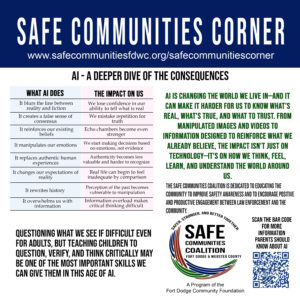
AI – A Deeper Dive of the Consequences
AI: A Deeper Dive Into the Consequences What Parents Need...
Read More